


Most businesses don’t realize they have a Microsoft 365 security problem until it’s too late.
The assumption is simple: Microsoft built the platform, Microsoft maintains the platform, so Microsoft must be securing everything inside it. That logic makes sense until an account gets compromised, critical files disappear, or an audit reveals gaps no one knew existed.
Microsoft 365 does include strong security features. The problem isn’t the tools; it’s the assumption that having access to tools is the same as being protected. Understanding what Microsoft 365 security covers, and where responsibility shifts to the business is the difference between real protection and expensive surprises.
This article breaks down where Microsoft’s security ends, where your responsibility begins, and what you need to do about the space in between.

The Shared Responsibility Model Explained
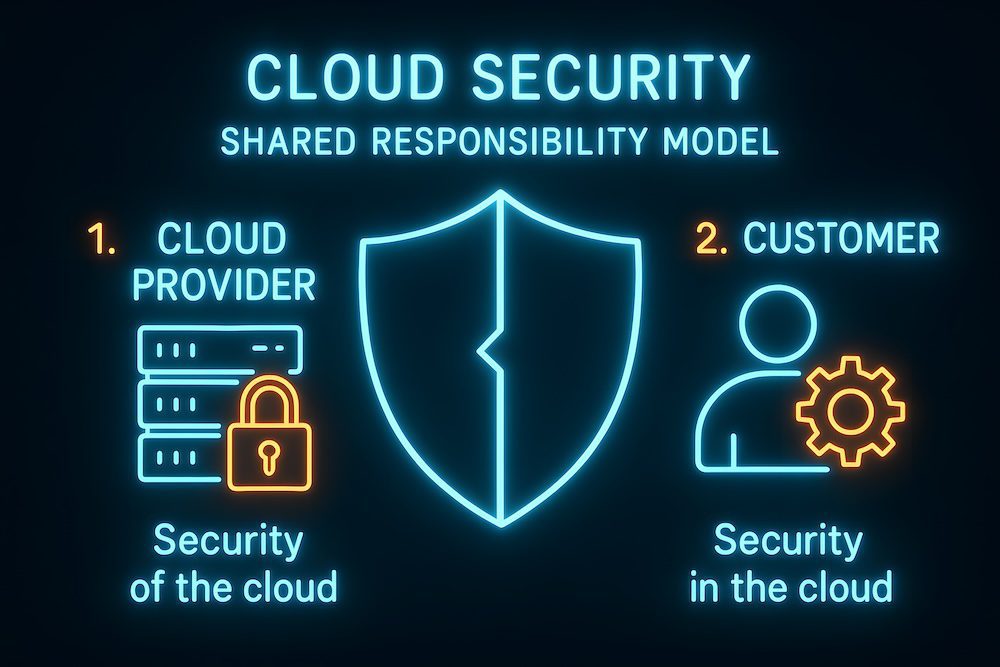
Microsoft 365 follows a shared responsibility model. That means Microsoft secures the platform itself, while customers are responsible for how they use it.
Microsoft is responsible for:
- Physical security of data centers
- Infrastructure protection
- Network availability and uptime
- Keeping the platform patched and maintained
This is a significant part of the security picture, but it’s only the foundation.
Businesses are responsible for:
- Who can access Microsoft 365
- How accounts are secured
- How data is shared and stored
- How activity is monitored
- What happens when something goes wrong
Security issues rarely happen because Microsoft’s data centers fail. Most incidents stem from compromised accounts, poor configuration, or the lack of visibility into what users are doing.
What Microsoft 365 Security Does Cover
Microsoft 365 provides several built-in security capabilities. When configured correctly, they offer a solid starting point for protecting users and data.
Identity and Access Protection
Microsoft 365 supports modern identity controls designed to protect accounts: multi-factor authentication options, role-based access for administrators, and secure sign-in infrastructure. These features help reduce unauthorized access, especially when credentials are stolen. However, they must be enforced consistently. If MFA is optional or limited to certain users, risk remains.
Email and Collaboration Threat Protection
Microsoft includes protections to filter out common threats: spam and phishing detection, scanning attachments and links, and basic protections across Outlook, Teams, and SharePoint. These tools stop many routine attacks. They’re effective against known threats but less reliable against targeted phishing or social engineering that appears legitimate.
Data Protection at the Platform Level
Microsoft encrypts data at rest in their data centers and in transit between systems. This protects data from being intercepted or accessed directly from the infrastructure. Encryption doesn’t stop someone with valid credentials from accessing, deleting, or sharing data improperly.
Compliance and Audit Capabilities
Microsoft 365 includes tools for visibility and compliance: audit logs for user and admin activity, retention policies for emails and files, and eDiscovery tools for investigations. These tools are powerful when configured correctly. Many organizations never turn them on or review them regularly, which limits their usefulness.
What Microsoft 365 Security Does Not Cover
This is where many assumptions break down. Microsoft provides the tools, but several critical areas remain the business’s responsibility.
Misconfigurations and Unused Features
Microsoft 365 prioritizes usability by default. Security features often require manual setup. MFA may not be enforced across all users, conditional access policies may not exist, and admin privileges may be too broad. A business can technically have security features available without actually being protected.
User Behavior and Human Error
Microsoft can’t prevent users from falling for realistic phishing emails, approving fraudulent MFA prompts, or sharing sensitive files incorrectly. An employee might receive an email that looks legitimate and enter their credentials on a fake page. From Microsoft’s perspective, a valid user just signed in. The system doesn’t know the difference.
Data Backup and Recovery
This is one of the most misunderstood areas. Microsoft offers retention, not full backups. Retention helps with short-term recovery but has limits.
Here’s the difference: Say ransomware encrypts your files on Monday and syncs across your environment. Retention policies keep those encrypted versions for 30 days (or whatever your retention period is), but once that window closes, you lose access to the clean files entirely. Or imagine a user accidentally deletes an entire folder on March 15th. If no one notices until April 20th, 35 days later, and your retention is set to 30 days, those files are gone permanently.
Retention gives you a recovery window that eventually expires. Backup gives you a restoration point you control indefinitely.
Other problems with relying on retention alone: if ransomware encrypts files, those encrypted versions can sync across OneDrive and SharePoint, overwriting the clean copies. Retention will preserve the encrypted files, not the originals. And if an entire user account is deleted, intentionally or by mistake, everything associated with that account can be lost permanently once the retention period expires.
Ongoing Monitoring and Incident Response
Microsoft doesn’t actively monitor individual customer environments for suspicious behavior. Alerts may exist, but someone must review them, understand them, and respond quickly. If no one is watching, issues can go unnoticed for days or weeks. Microsoft won’t step in to investigate suspicious activity inside your tenant unless there’s a broader platform issue.
Real-World Business Risks of Assuming Full Coverage
The gap between expectations and reality creates real business risk.
Imagine a scenario where an employee’s credentials are compromised through a phishing email. The attacker logs in, creates inbox rules to hide alerts, and quietly accesses financial documents stored in SharePoint. No alarms are raised because nothing appears technically broken.
In another scenario, a disgruntled employee deletes large amounts of data before leaving the company. The files remain unrecoverable once retention limits are reached.
Compliance issues can also surface during audits. Missing logs, incomplete access controls, or unclear data handling processes can expose gaps that leadership never realized existed.
These situations are common because they rely on assumptions rather than visibility.
How Businesses Can Close the Security Gaps
Microsoft 365 is a strong platform, but it works best when paired with deliberate management.
Regular Configuration Reviews
Security settings should be reviewed regularly: enforce MFA for all users, limit administrative access, review sharing and guest access, and align policies with how employees work. Security needs change as businesses grow, add users, or adopt new workflows.
Additional Protection Layers
Many organizations add advanced email filtering (that can catch sophisticated phishing attempts Microsoft’s filters may miss), independent cloud backups (that create recovery points separate from Microsoft’s retention), and endpoint and identity monitoring (security platforms that detect unusual login patterns or data access). These layers help catch what built-in tools may miss and provide recovery options when things go wrong.
Ongoing Oversight and Accountability
Security requires ongoing attention. Someone has to monitor alerts, respond when things go wrong, adjust policies as needed, and keep users informed. Most businesses assign this to their IT team or bring in a Managed Services provider with solid Microsoft 365 security expertise.
Next Steps: Making Security Intentional
Microsoft 365 provides powerful security capabilities, but protection depends on how those capabilities are used. The platform secures the infrastructure. Businesses must secure access, data usage, and daily activity.
Understanding what Microsoft 365 does and doesn’t cover removes false confidence and replaces it with informed decision-making. That clarity allows organizations to strengthen security before an issue forces the conversation.
If you’re unsure where your organization stands, start with three questions: Is MFA enforced for every user? Do we have independent backups of our Microsoft 365 data? Who’s actively monitoring our environment for suspicious activity?
The answers will show you where you stand and what needs to change.
Not Sure Where Your Microsoft 365 Security Stands?
GoodSuite offers a comprehensive Cyber Risk Assessment that identifies vulnerabilities in your Microsoft 365 environment and gives you a clear path forward. We’ll review your configuration, catch what’s been overlooked, and help you implement the protection your business needs.
Contact us today to schedule an assessment or to speak with our team.
About GoodSuite
GoodSuite is a boutique Managed Services provider that helps businesses simplify, secure, and support their technology environment. Their services include Managed IT, Cybersecurity, Cloud Solutions, Backup and Disaster Recovery, Managed Print Services, and VoIP phone systems, along with office technology such as copiers and printers. Based in California, GoodSuite supports organizations across Southern California and throughout the United States with proactive service and strategic technology guidance.